
| S2TBX options | |
It is possible to configure the Sentinel-2 Cache and to select if, to load or not, the different S2 masks.
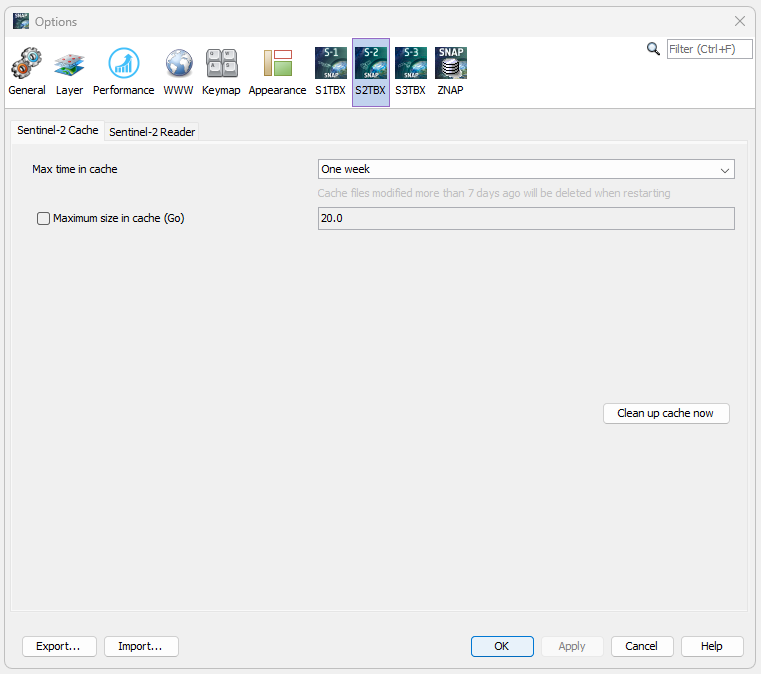
The S2 images are originally in JP2 format. These images are
decompresed (by tiles) to new GeoTiff images internally in SNAP.
These GeoTiff images are stored in
[userFolder]/.snap/var/cache/s2tbx in order to be available in the
future when working with the same images. The user can select in
the S2TBX options interface when to delete the cache and also there
is a button to clean up the cache.
Moreover, the user can active the cache size checking over the time
(checked every minutes).
Then the maximum cache size can be adapted. In case of exceeding
cache size, the oldest product files should be deleted until the
cache size has been reached 75% of the specified maximum.

The Sentinel-2 products contain different kind of masks in GML format or newly JPEG2000 format. By default, all the masks are loaded but the user can select to ignore some of them in order to be able to open the products faster.
The Sentinel-2 products contain ECMWFT auxilary data and also from the PSD 14.8 CAMSFO auxilary data. By default, all the auxilary data are loaded but the user can select to ignore some of them in order to be able to open the products faster.
From the PSD 14.8, a radiometric offset will be added up to the image reflectance at Level-1C (also at Level-2A). By default, the band are loaded without the negative offset, but the user can select to add the negative offset.