Sentinel-1 Back Geocoding
This operator co-registers two S-1 SLC
split products (reference and secondary) of the same sub-swath
using the orbits of the two products and a Digital Elevation Model
(DEM).
In resampling the secondary
images into reference frame, deramp and demodulation are performed
first to the secondary image, then the truncated-sinc interpolation
is performed. Finally, the reramp and remodulation are applied to
the interpolated secondary image.
Input
- Before running this operator, user should first run S-1 TOPS
Split operator to both reference and secondary products to get the
same sub-swath and same polarization data for co-registration (e.g.
IW1 - VV).
- The user should run Apply Orbit File to correct the orbits in
both the split products with the Sentinel Precise (or Restitude)
orbit files. This step can be skipped if no precise or restitude
orbit file is available. Otherwise this step is always recommended
in order to achieve better co-registration result.
Output
- The output of the operator are the co-registered reference and
secondary bands in I/Q format.
Parameters Used
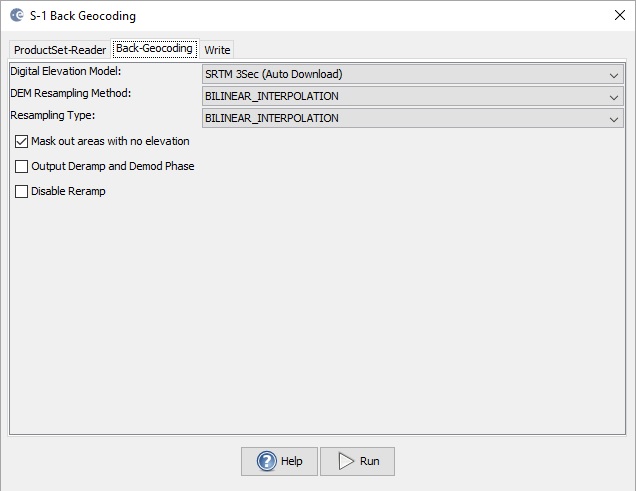
- Digital Elevation Model: The DEM type. Currently the following
DEMs are supported
-
- ACE2_5min
- ACE30
- ASTER 1sec GDEM
- GETASSE30
- SRTM 1Sec Grid
- SRTM 3Sec
- user provided external DEM file
- DEM Resampling Method: Interpolation method for obtaining
elevation values from the original DEM file. The following
interpolation methods are available
-
- nearest neighbour
- bi-linear
- cubic convolution
- 5-points bi-sinc
- 11-points bi-sinc
- 21-points bi-sinc
- bi-cubic
- Resampling Type: Interpolation methods for obtaining pixel
values from the source image. The interpolation methods available
are the same as listed above. Generally the accurate 21-point
truncated sinc interpolation is encouraged to use for complex image
interpolation. This, of course, will take longer processing time
than using other interpolation method. With other interpolation
method, however, some oscillation effect could be introduced in the
interpolated image and in the coherence image generated later on.
- Mask out areas with no elevation: Checkbox indicating if
areas without elevation should be masked out from co-registration.
It is recommended to select this checkbox to avoid artefacts along
the coast in the co-registered images.
- Output Deramp and Demod Phase: Checkbox indicating if deramp
and demodulation phases should be output as separated bands. This
option is mostly for debugging purpose and not recommended for most
users.
- Disable Reramp: Checkbox indicating if deramped and demodulated
reference and secondary bands should be output. This option is
generally not necessary if the coregistered reference and secondary
bands will be used in generating interferogram. However, if this
option is selected, we suggest you disable the "Mask out areas with
no elevation" option. This is because the valid zeros in bands may
be treated as invalid noDataValue and causes problem in the later
on processing.